When you look at your website from the front end, everything may seem fine. Your pages load, your content is published, your sitemap is submitted, and your important service or product pages are live. But here is the real question: is Googlebot actually crawling the pages that matter most? This is where SEO Log Analysis becomes extremely valuable.
Many website owners depend only on ranking tools, Google Search Console, or site crawlers to understand SEO performance. These tools are useful, but they do not always show the full picture. A crawler tells you what can be crawled. Google Search Console gives you crawl trends and indexing signals. But SEO Log Analysis shows what search engine bots actually requested from your server.
In simple words, it helps you understand what Googlebot really crawls, what it ignores, where it wastes time, and which technical issues may be affecting your website’s organic performance.
If your website has indexing problems, ranking drops, crawl budget issues, slow discovery of new pages, or repeated errors, SEO Log Analysis can help you find the real cause instead of guessing.
Table of Contents
What Is SEO Log Analysis?
SEO Log Analysis is the process of reviewing server log files to understand how search engine crawlers interact with your website. These server logs record every request made to your website, including requests from users, Googlebot, Bingbot, other search engine bots, and even unwanted bots.
For SEO, the main goal is to filter this data and focus on search engine crawlers, especially Googlebot.
Through SEO Log Analysis, you can see:
- Which URLs Googlebot crawled
- How often Googlebot visited specific pages
- Which pages returned errors
- Which pages were ignored
- Whether Googlebot crawled redirected URLs
- Whether crawl budget was wasted on low value pages
- Whether important pages received enough crawl attention
This makes SEO Log Analysis one of the most practical methods for understanding real crawl behavior.
Why SEO Log Analysis Matters for Technical SEO?
Search engines cannot rank what they cannot properly crawl, process, and index. If Googlebot is spending too much time on low value URLs, duplicate pages, parameter URLs, old redirects, or broken pages, your important content may not get the crawl attention it deserves.
That is why SEO Log Analysis is a major part of advanced technical SEO.
A normal SEO audit can show broken links, missing tags, duplicate titles, sitemap problems, and page speed issues. But log analysis goes deeper. It shows how Googlebot is actually behaving on your website.
For businesses investing in technical SEO crawl audit services, log analysis can be a powerful addition because it connects technical problems with real crawler activity.
Key Benefits of SEO Log Analysis
| Benefit | Why It Matters |
|---|---|
| Finds crawl waste | Shows if Googlebot is spending time on low value URLs |
| Detects crawl errors | Helps identify 404, 500, and redirect issues |
| Improves crawl efficiency | Helps Googlebot reach important pages faster |
| Supports indexing fixes | Reveals why some pages may not be discovered or crawled often |
| Helps large websites | Useful for ecommerce, publishers, SaaS, and large blogs |
| Strengthens technical audits | Adds real server data to SEO recommendations |
In short, SEO Log Analysis helps you move from assumption to evidence.
What Googlebot Really Crawls?
Many website owners believe that if a page is in the sitemap, Googlebot will crawl it regularly. That is not always true.
Googlebot discovers and crawls URLs through many signals, including internal links, XML sitemaps, redirects, external links, previous crawl history, and site quality signals. But it does not crawl every page equally.
Some pages may be crawled daily. Some may be crawled weekly or monthly. Some may barely get crawled at all.
With SEO Log Analysis, you can identify the exact difference between pages you want Googlebot to crawl and pages Googlebot is actually crawling.
Pages Googlebot Usually Crawls More Often
| Page Type | Possible Reason |
|---|---|
| Homepage | Strong internal authority and frequent discovery |
| Main category pages | Important site structure |
| Recently updated content | Freshness signals |
| Popular blog posts | Strong internal or external links |
| XML sitemap URLs | Submitted for discovery |
| High authority pages | More crawl demand |
Pages Googlebot May Crawl Too Much
| Page Type | SEO Risk |
|---|---|
| URL parameter pages | Duplicate or thin content |
| Filter pages | Crawl budget waste |
| Internal search pages | Low value crawl paths |
| Old redirected URLs | Repeated unnecessary requests |
| 404 pages | Crawl inefficiency |
| Non canonical URLs | Duplicate crawl signals |
The purpose of SEO Log Analysis is not only to see where Googlebot goes. It is also to understand whether Googlebot is spending time in the right places.
SEO Log Analysis vs Google Search Console Crawl Analysis
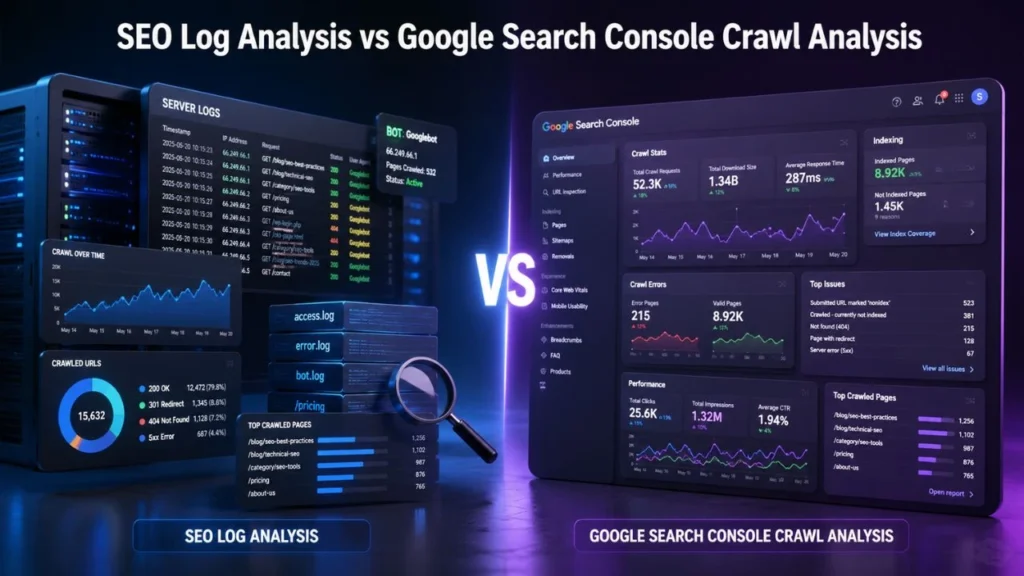
Many people ask whether they still need log analysis if they already use Google Search Console. The answer is yes.
Google Search Console crawl analysis gives helpful crawl information, but it is usually summarized. It can show crawl trends, response code groups, host status, and average response time. However, server logs give more direct URL level data.
Both are useful, but they serve different purposes.
| Factor | SEO Log Analysis | Google Search Console Crawl Analysis |
|---|---|---|
| Data source | Server logs | Google Search Console |
| URL level detail | Very strong | Limited |
| Shows exact bot requests | Yes | Partly |
| Shows crawl trends | Yes | Yes |
| Helps find crawl waste | Very useful | Limited |
| Shows server response issues | Yes | Yes |
| Best for | Deep technical investigation | Crawl monitoring and validation |
You should not treat Google Search Console crawl analysis and SEO Log Analysis as competitors. You should use them together.
Google Search Console can tell you that crawl activity changed. SEO Log Analysis can help you understand what changed, which URLs were affected, and why it matters.
Why Google Search Console Crawl Analysis Is Still Important?
Although logs are deeper, Google Search Console crawl analysis is still very useful for SEO teams and website owners.
It can help you check:
- Total crawl requests
- Crawl request trends
- Server response patterns
- Host status issues
- Average response time
- Crawl spikes
- Googlebot type
- File type breakdown
For example, if crawl requests suddenly drop, Google Search Console may help you notice the issue. Then SEO Log Analysis can help you investigate which sections of the website were affected.
This combined approach gives you a stronger technical SEO workflow.
Robots.txt and Googlebot Crawl Control
Another important part of crawl management is robots.txt and Googlebot crawl control.
Your robots.txt file tells crawlers which parts of your website they are allowed or not allowed to crawl. It can be useful for controlling crawler access to low value areas of a website, such as internal search pages, cart pages, login pages, or certain parameter based URLs.
However, robots.txt must be used carefully.
If you block the wrong section, Googlebot may not be able to access important content or resources. If you fail to block unnecessary crawl paths, Googlebot may waste time crawling URLs that do not help your organic visibility.
That is why robots.txt and Googlebot crawl control should be reviewed together with log file data.
What Robots.txt Can and Cannot Do
| Robots.txt Function | Explanation |
|---|---|
| Can control crawling | It can stop Googlebot from crawling selected paths |
| Cannot guarantee deindexing | A blocked URL may still appear if discovered elsewhere |
| Can reduce crawl waste | Useful for low value crawl paths |
| Cannot fix poor site structure | Internal linking and canonicals still matter |
| Can block resources | Blocking CSS or JS may affect rendering |
| Needs testing | Wrong rules can harm SEO performance |
Good robots.txt and Googlebot crawl control should support your crawl strategy, not damage it.
How SEO Log Analysis Helps You Find Crawl Budget Waste?

Crawl budget refers to the number of URLs Googlebot can and wants to crawl on your website. For smaller websites, crawl budget may not be a major issue. But for large websites, ecommerce stores, publishers, marketplaces, and websites with thousands of URLs, crawl waste can become a serious technical SEO problem.
SEO Log Analysis helps you find where crawl budget is being wasted.
Common Crawl Budget Waste Issues
| Crawl Waste Issue | Why It Hurts SEO |
|---|---|
| Parameter URLs | Creates many duplicate or near duplicate pages |
| Redirect chains | Makes Googlebot follow unnecessary paths |
| 404 errors | Wastes crawl requests on missing pages |
| Thin pages | Uses crawl budget on weak content |
| Internal search pages | Can create unlimited low value URLs |
| Duplicate category pages | Dilutes crawl focus |
| Old URLs in sitemap | Sends poor discovery signals |
When you reduce crawl waste, you help Googlebot focus more on pages that matter for ranking, traffic, leads, and revenue.
Common Problems Found Through SEO Log Analysis
A good SEO Log Analysis can uncover technical issues that may not be obvious in a basic SEO report.
1. Googlebot Crawling Too Many 404 Pages
If Googlebot frequently crawls missing pages, it may mean your internal links, old sitemap URLs, or external backlinks are pointing to deleted content.
Some 404s are normal. But if Googlebot keeps hitting many broken URLs, you should investigate.
Possible fixes include:
- Updating internal links
- Removing dead URLs from XML sitemaps
- Redirecting valuable deleted pages
- Fixing broken navigation paths
2. Googlebot Following Redirect Chains
Redirects are common during website updates, migrations, and URL changes. But long redirect chains waste crawl time.
For example:
Old URL → Redirected URL → Another Redirected URL → Final URL
This creates unnecessary steps for Googlebot.
With SEO Log Analysis, you can identify which redirected URLs Googlebot is still crawling and update internal links to point directly to the final destination.
3. Googlebot Crawling Non Canonical URLs
Canonical tags tell search engines which version of a page should be treated as the preferred version. But if Googlebot keeps crawling non canonical URLs, it may show that your internal links, sitemap, or site structure are sending mixed signals.
This can happen with:
- Filter URLs
- Tracking URLs
- Duplicate blog URLs
- HTTP and HTTPS versions
- WWW and non WWW versions
- Parameter based pages
A strong SEO Log Analysis helps you see whether Googlebot is wasting time on duplicate URL versions.
4. Important Pages Not Getting Crawled
This is one of the most important findings from log analysis.
Your key service pages, product pages, category pages, or lead generation pages may not be receiving enough Googlebot attention.
Possible causes include:
- Weak internal linking
- Deep crawl depth
- Missing sitemap entries
- Poor content quality
- Slow server response
- Noindex tags
- Robots.txt blocks
- Poor site architecture
This is where technical SEO crawl audit services can help because the issue may involve several technical and content related factors.
5. Googlebot Crawling Parameter URLs
Parameter URLs are common on ecommerce and large websites. They often appear because of sorting, filtering, tracking, search, or session settings.
Examples include:
?sort=price?filter=size?utm_source=facebook?sessionid=123?color=black
If these URLs are not controlled properly, Googlebot may crawl many duplicate or low value pages.
Here, robots.txt and Googlebot crawl control, canonical tags, internal link cleanup, and sitemap hygiene can all work together.
Step by Step SEO Log Analysis Process
A proper SEO Log Analysis should follow a structured process. Randomly checking log files will not give you useful insights. You need to organize the data and connect it with SEO priorities.
Step 1: Collect Server Log Files
First, collect server logs from your hosting server, CDN, or cloud platform.
Common sources include:
- Apache logs
- Nginx logs
- cPanel logs
- Cloudflare logs
- CDN logs
- Hosting dashboard logs
The more complete your log data is, the better your analysis will be.
Step 2: Filter Googlebot Requests
Server logs include all types of requests. You need to separate real search engine crawler activity from normal user traffic and spam bots.
Focus on:
- Googlebot Smartphone
- Googlebot Desktop
- Bingbot
- Google Image bot
- AdsBot
- Other search crawlers
Since fake bots can use the Googlebot user agent, it is important to verify that the requests are from real Googlebot sources.
Step 3: Segment URLs by Type
Once you filter Googlebot requests, group your URLs into meaningful sections.
| URL Segment | Example |
|---|---|
| Homepage | / |
| Blog posts | /blog/post-name/ |
| Service pages | /services/service-name/ |
| Product pages | /product/product-name/ |
| Category pages | /category/category-name/ |
| Parameter URLs | ?filter= |
| Redirected URLs | 301 or 302 URLs |
| Error URLs | 404 or 500 URLs |
| Static resources | CSS, JS, images |
This helps you understand which parts of the website Googlebot is crawling most.
Step 4: Analyze Status Codes
Status codes show how your server responded to Googlebot.
| Status Code | Meaning | SEO Action |
|---|---|---|
| 200 | Page loaded successfully | Good if the page is valuable |
| 301 | Permanent redirect | Check for redirect chains |
| 302 | Temporary redirect | Use carefully |
| 404 | Page not found | Fix broken internal links |
| 410 | Gone | Useful for permanently removed content |
| 500 | Server error | Fix urgently |
| 503 | Service unavailable | Check server stability |
If important pages return 5xx errors, that should be treated as a high priority issue.
Step 5: Compare Logs with XML Sitemap
Your XML sitemap should include important, indexable, canonical URLs. It should not contain broken, redirected, noindex, or duplicate pages.
During SEO Log Analysis, compare sitemap URLs with crawled URLs.
Look for:
- Sitemap URLs Googlebot never crawled
- Crawled URLs missing from the sitemap
- Sitemap URLs returning errors
- Non canonical URLs in the sitemap
- Redirected URLs in the sitemap
- Low value URLs getting too much crawl attention
This comparison can reveal serious discovery and crawl priority issues.
Step 6: Compare Logs with Google Search Console Crawl Analysis
Next, compare your log data with Google Search Console crawl analysis.
Google Search Console can show crawl trends, but logs show URL level activity. When you combine both, you can answer questions like:
- Did Googlebot crawl less after a migration?
- Are server errors increasing?
- Are important pages getting fewer requests?
- Is Googlebot crawling too many parameter URLs?
- Did robots.txt changes affect crawl behavior?
- Are mobile and desktop bots behaving differently?
This gives you a stronger technical SEO picture.
Step 7: Prioritize Fixes
Not every crawl issue has the same SEO impact. You need to prioritize based on importance.
| Priority | Issue | Recommended Action |
|---|---|---|
| Critical | 5xx errors on important pages | Fix server or hosting issues |
| High | Important URLs not crawled | Improve internal linking and sitemap |
| High | Googlebot blocked from key content | Review robots.txt |
| Medium | Redirect chains | Update internal links |
| Medium | Parameter crawl waste | Use canonicals, robots.txt, or URL controls |
| Low | Old external 404s | Redirect only if valuable |
A strong SEO Log Analysis does not just report issues. It helps you decide what to fix first.
When Should You Use Technical SEO Crawl Audit Services?
You may need technical SEO crawl audit services if your website is too large, too complex, or facing recurring crawl and indexing problems.
You should consider expert support if:
- Your important pages are not getting indexed
- Googlebot crawls too many low value URLs
- Your crawl stats suddenly drop
- You recently migrated your website
- You changed URL structure
- Your ecommerce filters create many URLs
- Your website has thousands of pages
- Your sitemap contains errors
- You see many 404 or 5xx errors
- You depend heavily on organic traffic
Professional technical SEO crawl audit services can combine server log data, Google Search Console data, sitemap review, robots.txt review, crawl simulation, internal linking analysis, and indexation checks.
This gives you a more complete solution instead of isolated recommendations.
SEO Log Analysis Checklist
Use this checklist to review your crawl health.
| Checkpoint | Question to Ask | Action |
|---|---|---|
| Googlebot access | Can Googlebot reach important pages? | Improve crawl paths |
| Crawl frequency | Are key pages crawled regularly? | Strengthen internal links |
| Crawl waste | Are low value URLs over crawled? | Control parameters and duplicates |
| Status codes | Are bots hitting errors? | Fix 404, 500, and redirect issues |
| Sitemap quality | Are sitemap URLs clean? | Remove bad URLs |
| Robots.txt | Are important pages blocked? | Review crawl rules |
| Mobile crawling | Is Googlebot Smartphone active? | Check mobile first issues |
| Server speed | Is response time too high? | Improve hosting and caching |
| Canonicals | Are non canonical URLs crawled too much? | Fix internal signals |
| Indexable pages | Are valuable pages receiving crawl attention? | Improve architecture |
This checklist can make your SEO Log Analysis more practical and action focused.
How to Fix Issues Found in SEO Log Analysis?
Finding issues is only the first step. The real value comes from fixing them.
Fix Crawl Waste
To reduce crawl waste:
- Remove unnecessary internal links to parameter URLs
- Clean up duplicate pages
- Use canonical tags correctly
- Improve robots.txt and Googlebot crawl control
- Remove bad URLs from XML sitemaps
- Block low value crawl paths carefully
- Avoid creating endless filter combinations
Fix Crawl Errors
To fix crawl errors:
- Repair broken internal links
- Redirect valuable deleted pages
- Remove dead URLs from sitemaps
- Fix server errors
- Reduce redirect chains
- Monitor recurring 404s
- Improve server stability
Improve Crawl Priority for Important Pages
To help Googlebot find important pages faster:
- Add contextual internal links
- Keep XML sitemaps updated
- Reduce crawl depth
- Improve content quality
- Add relevant schema markup
- Update stale content
- Improve page speed
- Make navigation cleaner
A good SEO Log Analysis should always end with clear technical recommendations.
SEO Log Analysis Mistakes to Avoid
Even experienced teams can make mistakes while analyzing crawl data.
Relying Only on Google Search Console
Google Search Console crawl analysis is useful, but it does not replace server logs. If you want URL level detail, logs are essential.
Blocking Too Much in Robots.txt
Overusing robots.txt can accidentally block important content or resources. Always review robots.txt and Googlebot crawl control carefully before making changes.
Ignoring Mobile Googlebot
Google primarily uses mobile first indexing. So, Googlebot Smartphone activity is especially important.
Treating Every Crawled URL as Valuable
Just because Googlebot crawls a URL does not mean the URL is useful. Some crawled pages may be duplicate, thin, broken, or non indexable.
Not Connecting Crawl Data with Business Goals
Your most important landing pages, service pages, product pages, and lead generation pages should receive crawl attention. If they do not, you need to fix your crawl paths.
Sample SEO Log Analysis Report Structure
If you are preparing a professional report, structure it clearly.
Crawl Data Overview
| Metric | What It Shows |
|---|---|
| Total Googlebot requests | Overall crawl activity |
| Most crawled sections | Googlebot’s crawl focus |
| Top status codes | Crawl quality |
| Top error URLs | Technical issues |
| Mobile vs desktop bot | Mobile first crawling behavior |
| Sitemap vs crawled URLs | Discovery alignment |
| Crawl frequency by folder | Section level crawl priority |
Recommended Fixes
Group recommendations into:
- Critical fixes
- High priority fixes
- Medium priority fixes
- Low priority fixes
This makes the report easier for developers, SEO teams, and business owners to act on.
Conclusion
SEO Log Analysis gives you a clear view of what Googlebot really crawls on your website. Instead of guessing why pages are not indexed, why crawl activity changed, or why important URLs are ignored, you can use real server data to understand the problem.
When you combine SEO Log Analysis with Google Search Console crawl analysis, XML sitemap review, internal linking checks, and robots.txt and Googlebot crawl control, you get a much stronger technical SEO strategy.
If your website is large, complex, or struggling with crawl and indexing problems, investing in technical SEO crawl audit services can help you identify hidden issues and fix them with confidence.
The goal is simple: make it easier for Googlebot to crawl the pages that matter most. When your crawl paths are cleaner, your technical foundation becomes stronger, and your website gets a better chance to perform across Google Search, AI search, answer engines, and voice search.
FAQs
What is SEO Log Analysis?
SEO Log Analysis is the process of reviewing server log files to understand how Googlebot and other search engine crawlers interact with your website.
Why is SEO Log Analysis important?
It helps you find crawl waste, server errors, redirect issues, blocked pages, ignored pages, and crawl patterns that affect SEO performance.
Is Google Search Console crawl analysis enough?
No. Google Search Console crawl analysis is useful for crawl trends and server response insights, but server logs provide more detailed URL level data.
How does robots.txt affect Googlebot crawling?
robots.txt and Googlebot crawl control help manage which areas of your website Googlebot can crawl. However, robots.txt should be used carefully because incorrect rules can block important content.
Can SEO Log Analysis improve rankings?
SEO Log Analysis can indirectly support better rankings by helping Googlebot crawl important pages more efficiently and avoid low value URLs.
Who needs technical SEO crawl audit services?
Websites with many pages, crawl budget issues, indexing problems, migration errors, ecommerce filters, or technical SEO complexity may need technical SEO crawl audit services.
How often should SEO Log Analysis be done?
Large websites should perform SEO Log Analysis regularly, such as monthly or quarterly. Smaller websites can do it after migrations, redesigns, indexing issues, or major traffic drops.
What is crawl budget waste?
Crawl budget waste happens when Googlebot spends too much time crawling low value URLs, such as duplicate pages, parameter URLs, internal search pages, broken URLs, and old redirects.