Duplicate content can quietly weaken search visibility, confuse search engines, and reduce the ranking strength of your important pages. Many website owners think duplicate content only means copied content, but in SEO, the issue is much broader. The same or very similar content can appear through URL variations, product filters, blog tags, category archives, tracking parameters, copied descriptions, printer friendly pages, and CMS generated URLs.
A proper duplicate content fix SEO plan helps search engines understand which page should rank, which pages should be ignored, and which URLs should pass value to the main version. When done correctly, you do not need to lose rankings while fixing duplicate content. You can improve indexation, protect traffic, and make your website easier for Google, Bing, AI search tools, and voice search systems to understand.
This guide explains how to identify duplicate content, choose the right fix, protect ranking signals, and improve your site structure without harming existing SEO value.
Table of Contents
What Is Duplicate Content in SEO?
Duplicate content means the same or highly similar content appears on more than one URL. This can happen on the same website or across different websites.
For example, a product page may be accessible through multiple category paths. A blog post may appear under tags, author archives, and date archives. A service page may have different URL versions with the same content. These pages may not be created with bad intent, but they can still create SEO problems.
Common Types of Duplicate Content
Duplicate content can appear in many forms, such as:
- Internal duplicate pages
- External copied content
- Near duplicate pages
- Duplicate product descriptions
- Duplicate meta titles
- Duplicate meta descriptions
- URL parameter duplication
- HTTP and HTTPS versions
- www and non www versions
- Filtered ecommerce URLs
- Tag and category archive pages
- Similar service pages
- Copied manufacturer content
Search engines usually try to choose one main version of a duplicate page. However, relying only on search engines is risky. If Google chooses the wrong URL, your preferred page may lose visibility.
Why Duplicate Content Can Hurt Rankings
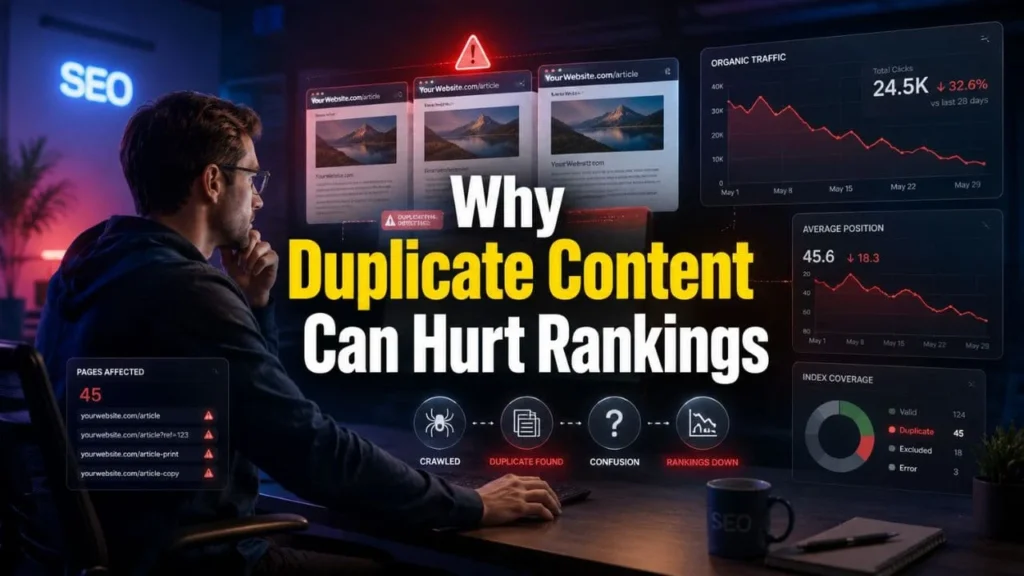
Duplicate content does not always cause a direct penalty. Still, it can create several ranking problems.
Search Engines May Rank the Wrong Page
When multiple pages contain similar information, search engines may not know which one should appear in search results. A weaker URL may rank instead of your main page, which can affect clicks, leads, conversions, and overall SEO ranking in India.
Ranking Signals Can Get Divided
Backlinks, internal links, engagement signals, and topical relevance may get spread across duplicate pages. Instead of one strong page, you may end up with several weaker pages competing against each other.
Crawl Budget Can Be Wasted
Search engines spend limited crawl resources on every website. If crawlers keep visiting duplicate URLs, they may spend less time discovering important service pages, product pages, and fresh blog content.
This is especially important for large ecommerce websites, service based websites, and content heavy blogs because poor duplicate URL management can affect crawl budget SEO and reduce the visibility of pages that deserve more attention.
AI Search and Voice Search May Get Confused
AI search tools and voice assistants need clear, trusted, and well structured information. If your website has multiple pages saying almost the same thing, these systems may struggle to identify the best answer source.
A strong duplicate content fix SEO process helps your content become clearer for search engines, AI answer engines, and voice search systems.

Main Causes of Duplicate Content Issues
Before fixing duplicate content, you need to understand where it comes from.
URL Variations
The same page may be available through different URL formats. This can also happen when a website does not manage absolute vs relative links SEO properly, as inconsistent linking patterns may send search engines to different versions of the same page.
- HTTP version
- HTTPS version
- www version
- non www version
- trailing slash version
- non trailing slash version
- uppercase URL version
- lowercase URL version
- URLs with tracking parameters
Each version can look like a separate page to search engines if not handled correctly.
Ecommerce Filters and Sort Options
Ecommerce websites often create duplicate pages through filters, sorting options, product variants, color choices, price ranges, and collection URLs. These pages may be useful for users, but many of them do not need to be indexed.
If you run an online store, you should also review Shopify SEO and duplicate content issues to understand how platform structure can affect duplicate page creation.
Copied Product Descriptions
Many ecommerce websites use manufacturer provided product descriptions. When hundreds of websites use the same description, your product page may not look unique to search engines.
Adding original product copy, clear specifications, FAQs, buying guidance, and useful internal links can improve content value.
Blog Tags, Categories, and Archives
WordPress and other CMS platforms often create tag pages, category pages, author archives, and date archives automatically. These pages can become thin or repetitive when not managed properly.
Similar Service Pages
Service websites often create separate pages for similar services, cities, or industries. If the content is too similar, search engines may not understand which page should rank.

How to Find Duplicate Content Before Fixing It
You should not start deleting or redirecting pages without a proper review. First, identify what kind of duplication exists and decide whether each page should be merged, rewritten, redirected, canonicalized, or removed from the index.
Check Google Search Console
Google Search Console can show indexing issues related to duplicate content. A proper Google Search Console SEO audit helps you find pages where Google has selected a different canonical URL, ignored duplicate pages, or discovered URLs that are not yet indexed. Look for reports such as:
- Duplicate without user selected canonical
- Alternate page with proper canonical tag
- Duplicate Google chose different canonical than user
- Crawled currently not indexed
- Discovered currently not indexed
These signals help you understand whether Google is confused about your preferred URLs.
Use Site Search Operators
You can search Google using exact sentences from your page. This helps you find similar content on your own website or copied versions on other websites.
Run a Technical SEO Crawl
Use tools like Screaming Frog, Sitebulb, Ahrefs, Semrush, or another reliable crawler to find:
- Duplicate titles
- Duplicate meta descriptions
- Duplicate H1 tags
- Duplicate body content
- Canonical tag errors
- Redirect chains
- Indexable parameter URLs
- Thin pages
Review Similar Pages Manually
Tools can find duplicate patterns, but human review is still needed. Some pages look similar but serve different search intent. Those pages should be improved, not removed.
Duplicate Content Causes and Best Fixes
| Duplicate Content Issue | Common Cause | Best SEO Fix |
|---|---|---|
| Same page available on multiple URLs | HTTP, HTTPS, www, non www, slash versions | 301 redirect to preferred URL |
| Product appears under multiple collections | Ecommerce URL structure | Canonical tag to main product URL |
| Thin tag or archive pages | WordPress or CMS generated pages | Noindex low value pages |
| Similar service pages | Repeated service content | Rewrite with unique search intent |
| Duplicate product descriptions | Manufacturer copied content | Add original product copy |
| Tracking parameter URLs | UTM and filter parameters | Canonical tag or parameter control |
| Old and new page both live | Content update or migration issue | 301 redirect old URL to new URL |
| Scraped content on other sites | External copying | Request removal or strengthen original authority |
Duplicate Content Fix SEO Strategy Without Losing Rankings
A good duplicate content fix SEO strategy should protect existing ranking value while making your site cleaner and easier to understand.
Step 1: Choose the Main URL
Every duplicate content group needs one preferred URL. This is the page you want search engines to index and rank.
Choose the main URL based on:
- Search intent
- Existing rankings
- Backlinks
- Organic traffic
- Content quality
- Conversion value
- Internal link strength
Once you choose the main URL, all SEO signals should point toward it.
Step 2: Use 301 Redirects When a Page Has No Separate Value
A 301 redirect is useful when a duplicate page does not need to remain live. It sends users and search engines to the preferred page.
Use 301 redirects for:
- Old URLs
- Replaced pages
- Merged blog posts
- HTTP to HTTPS versions
- www to non www versions
- Duplicate landing pages
- Outdated product pages with a replacement
Before adding a redirect, check whether the old page has traffic, backlinks, or useful content. If it does, move the useful content to the main page first.
Step 3: Use Canonical Tags When Similar Pages Must Stay Live
A canonical tag tells search engines which URL is the preferred version. It is useful when duplicate or near duplicate pages need to remain available for users.
Use canonical tags for:
- Product variants
- Tracking parameter URLs
- Similar collection pages
- Printable page versions
- Sort and filter pages
- Syndicated content
Make sure the canonical tag points to the most relevant matching page, not always the homepage.
Step 4: Use Noindex for Low Value Pages
Noindex tells search engines not to include a page in search results. This is useful for pages that users may need but search engines do not need to rank.
Use noindex for:
- Internal search result pages
- Thin tag pages
- Low value archive pages
- Login pages
- Thank you pages
- Utility pages
Do not add noindex to important service pages, category pages, or blog posts that should rank.
Step 5: Rewrite Pages With Different Search Intent
Not every similar page should be redirected or canonicalized. Some pages need better content.
For example, SEO services, Local SEO services, Digital marketing services, and social media marketing services can all exist on the same website if each page answers a different need.
To make similar pages unique:
- Change the H1 and H2 structure
- Add unique FAQs
- Improve entity coverage
- Add service specific benefits
- Use different keyword groups
- Add unique internal links
- Match the page to a clear user intent
This improves topical clarity and helps search engines understand why each page deserves to exist.
Step 6: Merge Similar Blog Posts Carefully
If two blog posts target the same keyword and answer the same question, merge them into one stronger post.
Follow this process:
- Choose the stronger URL
- Move useful sections from the weaker page
- Improve the final content
- Add a 301 redirect from the weaker URL
- Update old internal links
- Refresh the meta title and description
- Submit the main URL in Google Search Console
This helps reduce keyword cannibalization and strengthens one main page.
Step 7: Fix Internal Links
Internal links should point to the preferred URL. If your website keeps linking to duplicate pages, search engines may continue treating those URLs as important.
For technical cleanup, you can connect this topic to your service page using the anchor duplicate content fix SEO and link it to:
This internal link supports topical relevance between your blog post and your technical SEO service page.
Canonical Tag, Redirect, Noindex, or Rewrite
| SEO Fix | Best For | Ranking Signal Impact | When Not to Use |
|---|---|---|---|
| 301 Redirect | Duplicate pages with no unique value | Consolidates signals to main URL | When users still need both pages |
| Canonical Tag | Similar pages that must stay live | Suggests preferred URL to search engines | When the page should not exist |
| Noindex | Low value pages users may still access | Removes page from index over time | On important pages that should rank |
| Rewrite Content | Similar pages with different intent | Builds unique ranking potential | When pages serve the same intent |
| Merge Content | Competing blog posts or service pages | Strengthens one main URL | When both pages have separate search demand |
How to Fix Duplicate Content on Ecommerce Websites
Ecommerce websites often face duplicate content because one product can appear in many collections, filters, and sorting paths. Product variants can also create several similar URLs.
Fix Product URL Duplication
Choose one main product URL and make sure collection based versions point to the preferred product page through canonical tags.
Improve Product Descriptions
Avoid using only manufacturer descriptions. Add original content that helps users make better buying decisions.
You can include:
- Product benefits
- Size details
- Usage guidance
- Material information
- Delivery information
- Return information
- FAQs
- Comparison points
For ecommerce websites, you can also review duplicate content SEO fix services to understand how Shopify SEO improvements can support better search performance.
Control Filtered URLs
Filtered URLs can create hundreds or thousands of similar pages. Review which filters deserve indexation and which should remain non indexable.
Useful filter pages with real search demand may stay indexable. Thin filtered pages should usually be controlled with canonical tags, noindex, or crawl management.

How to Fix Duplicate Content on WordPress Websites
WordPress websites often generate duplicate content through categories, tags, author pages, date archives, and pagination.
Review Tags and Categories
If tags are not planned properly, they can create many thin pages. Keep only useful tag pages and noindex low value ones.
Avoid Repeating Similar Blog Topics
Publishing many posts around the same topic without a clear content plan can cause keyword cannibalization. Each blog post should target a unique query and support a clear internal linking path.
Manage SEO Plugin Settings
Review your SEO plugin settings for:
- Canonical tags
- Sitemap inclusion
- Archive indexation
- Category indexation
- Tag indexation
- Breadcrumbs
- Meta title templates
A proper setup supports better crawl efficiency and indexation clarity.

How Duplicate Content Affects Digital Marketing Performance
Duplicate content is not only a technical SEO issue. It can affect the performance of your overall Digital marketing services strategy.
If your pages are unclear, search engines may rank the wrong URL. If users land on weak or repeated content, they may leave without taking action. If AI search tools cannot identify your best answer source, your brand may miss visibility in answer based results.
For SEO services, duplicate content cleanup helps improve indexing, ranking clarity, and content quality. For Local SEO services, it helps keep service and location pages clear for local search and voice queries. For social media marketing services, cleaner landing pages can improve campaign relevance and user trust when people click through from social platforms.
Benefits of Fixing Duplicate Content
Fixing duplicate content can improve several parts of your SEO performance.
Better Indexation
Search engines can focus on your most important pages instead of wasting time on duplicate URLs.
Stronger Ranking Signals
Backlinks, internal links, and relevance signals can support one main page instead of being divided across several versions.
Better Crawl Efficiency
A cleaner website helps search engines crawl important pages more effectively.
Improved User Experience
Users reach the right page faster. They do not get confused by repeated pages or outdated content.
Better AI Search Visibility
AI search systems prefer clear, structured, and trustworthy sources. Reducing duplicate content, along with structured data AI AEO, helps your website present stronger answer sources for search engines, AI tools, and voice search platforms.
Improved Voice Search Readiness
Voice search often pulls short, clear answers from trusted pages. A clean content structure helps your pages become easier to understand.
Duplicate Content Fix Checklist
Use this checklist before and after making changes. It also works as an SEO checklist for new websites because duplicate content, canonical tags, redirects, indexation, and internal links should be reviewed from the beginning to avoid ranking issues later.
- Crawl your website
- Export duplicate titles
- Export duplicate meta descriptions
- Review duplicate H1 tags
- Check canonical tags
- Review Google Search Console indexing reports
- Identify duplicate URL patterns
- Choose the preferred URL
- Use 301 redirects where needed
- Add canonical tags where pages must stay live
- Use noindex for low value pages
- Rewrite similar pages with different intent
- Merge competing blog posts
- Update internal links
- Update sitemap
- Resubmit important URLs
- Monitor ranking and indexing changes

Common Mistakes to Avoid
Blocking Duplicate URLs Too Early
Do not block duplicate URLs in robots.txt before search engines can see redirects or canonical tags. Blocking too early can prevent search engines from processing your signals.
Canonicalizing Everything to the Homepage
Canonical tags should point to the closest matching preferred page. Sending every duplicate page to the homepage creates poor signals.
Using Noindex on Important Pages
Noindex should not be used on pages you want to rank. Use it only for pages that should stay accessible but not appear in search results.
Redirecting Without Reviewing Backlinks
Before redirecting a page, check whether it has backlinks or traffic. Useful content and authority should be moved to the preferred page first.
Ignoring Internal Links
If internal links still point to duplicate URLs, your cleanup may not work fully. Update menus, breadcrumbs, blog links, product links, and sitemap URLs.
FAQs
What is duplicate content in SEO?
Duplicate content means the same or very similar content appears on more than one URL. It can happen because of URL variations, ecommerce filters, copied descriptions, tag pages, category pages, or repeated service content.
What is duplicate content fix SEO?
Duplicate content fix SEO is the process of finding duplicate pages, choosing the preferred URL, consolidating ranking signals, adding canonical tags, using redirects, applying noindex where needed, and improving content uniqueness.
Can duplicate content reduce rankings?
Yes, duplicate content can reduce rankings indirectly. It can split ranking signals, waste crawl budget, create keyword cannibalization, and make search engines rank the wrong page.
Should I use canonical tags or 301 redirects?
Use a 301 redirect when the duplicate page has no separate purpose. Use a canonical tag when similar pages need to stay live for users but only one main version should rank.
How do I find duplicate content on my website?
You can use Google Search Console, SEO crawlers, duplicate title reports, duplicate meta description reports, site search operators, and manual page review.
Is duplicate content bad for ecommerce SEO?
Yes, ecommerce websites can face serious duplicate content issues from product variants, filters, tags, collection URLs, copied product descriptions, and pagination. These issues should be reviewed as part of ecommerce SEO maintenance.
How long does it take to recover after fixing duplicate content?
The timing depends on crawl frequency, website size, internal links, sitemap updates, and the number of affected URLs. Some changes may show movement in a few weeks, while larger websites may need more time.
Conclusion
Duplicate content can make your website harder for search engines, AI search tools, and users to understand. The right fix depends on the purpose of each page. Some pages need redirects. Some need canonical tags. Some need noindex. Some need better content.
A careful duplicate content fix SEO approach helps protect rankings while improving indexation, crawl efficiency, topical clarity, and user experience. When your preferred URLs are clear, your internal links are clean, and your content serves a unique purpose, your website becomes easier to rank across search engines, AI search results, and voice search answers.