When brands struggle with low open rates, poor reply rates, and spam folder placement, the problem often starts long before the message is sent. In many cases, the real issue is not the copy, the offer, or the list. It is the cold email infrastructure setup behind the campaign.
If you want your outreach to land in inboxes instead of disappearing into spam, you need a strong technical foundation. A proper cold email infrastructure setup helps mailbox providers trust your domain, verify your messages, and protect your reputation over time. That is where DMARC, SPF, and DKIM become essential.
In this guide, we will break down what cold email infrastructure setup means, why authentication matters, and how you can build a system that supports better deliverability. Whether you manage outbound campaigns in house or work with email infrastructure services, this guide will help you understand the basics clearly and use them more effectively.
Table of Contents
What Is Cold Email Infrastructure Setup?
A cold email infrastructure setup is the technical foundation that supports cold outreach. It includes the domains you send from, the mailboxes you use, the DNS records that authenticate your messages, your sending limits, your tracking setup, and the monitoring process that keeps everything healthy.
In simple terms, cold email infrastructure setup is what makes your outreach operationally safe and scalable.
Without a proper cold email infrastructure setup, even well written campaigns can struggle. You may have a relevant offer, a clean list, and strong personalization, but if your technical setup is weak, inbox providers may still treat your email as suspicious.
That is why smart businesses do not treat outbound in isolation. They connect it with broader Email Marketing goals, brand trust, and a larger Omni-Channel Ecosystem that includes content, retargeting, CRM workflows, and sales follow up.
Why Cold Email Deliverability Depends on Trust?
Mailbox providers want to protect their users. They scan signals that help them decide whether an email is legitimate, risky, or fraudulent. Your cold email infrastructure setup directly influences those signals.
When your infrastructure is sound, providers can verify:
- who is allowed to send from your domain
- whether your message was altered in transit
- whether your domain aligns with the authentication records you published
- how your domain wants suspicious email to be handled
This is why deliverability is not only a copy problem. It is also a trust problem. And trust starts with DNS authentication.
What SPF, DKIM, and DMARC Actually Do?
A strong cold email infrastructure setup depends on three core email authentication standards: SPF, DKIM, and DMARC. These work together to prove that your messages are genuine.
SPF
SPF, or Sender Policy Framework, tells receiving mail servers which servers are allowed to send email on behalf of your domain.
If your sending server is not included in your SPF record, the message may fail verification. In a cold email infrastructure setup, SPF acts as one of the first trust signals.
DKIM
DKIM, or DomainKeys Identified Mail, adds a digital signature to your outgoing message. That signature helps the receiving server confirm that the content has not been changed after it was sent.
In a reliable cold email infrastructure setup, DKIM strengthens your credibility because it shows that the message came from an authorized source and remained intact.
DMARC
DMARC, or Domain based Message Authentication, Reporting, and Conformance, builds on SPF and DKIM. It tells receiving servers how to handle mail that fails authentication checks and lets you receive reports about suspicious activity.
DMARC matters because it brings alignment and visibility. In a mature cold email infrastructure setup, DMARC helps you monitor abuse, reduce spoofing risk, and tighten your protection over time.
Why DMARC, SPF, and DKIM Matter for Cold Outreach?
Cold outreach already carries more scrutiny than regular transactional email. You are contacting people who may not know you yet. That means your cold email infrastructure setup has to work harder to establish trust.
When DMARC, SPF, and DKIM are configured properly, they help you:
- improve inbox placement
- reduce the chance of domain spoofing
- build a healthier sender reputation
- support scaling without unnecessary technical risk
- create a more stable foundation for Email Marketing
This is especially important when outbound is part of a wider acquisition strategy. If your outreach supports lead generation, nurture flows, and Performance Marketing Services, poor deliverability can affect far more than one campaign.
Core Elements of a Strong Cold Email Infrastructure Setup
A good cold email infrastructure setup is not just about adding three DNS records. It involves a full sending environment built to protect your main brand while giving your outreach room to grow.
Here are the key elements.
1. Sending Domain Strategy
Many businesses avoid sending cold outreach directly from their primary domain. Instead, they use closely related secondary domains or subdomains. This allows them to protect the main website domain while still maintaining brand relevance.
A thoughtful cold email infrastructure setup starts with choosing the right domain strategy.
2. Mailbox Creation
Each sender identity should look real, professional, and consistent. Avoid generic names that feel automated or suspicious. If your outreach looks human, your setup should support that impression.
3. SPF Configuration
Your SPF record needs to clearly list the services allowed to send on behalf of your domain. Too many includes or incorrect syntax can create problems, so accuracy matters.
4. DKIM Signing
Your sending platform should sign outgoing emails correctly, and the public key must be published in DNS. Without that alignment, your cold email infrastructure setup is incomplete.
5. DMARC Policy
Most teams begin with a monitoring policy, then move toward stricter enforcement after they confirm that everything is aligned correctly.
6. Tracking Domain Alignment
Click tracking and link branding can influence trust. If tracking looks disconnected from your domain, that may create unnecessary friction.
7. Warm Up and Sending Control
Even the best cold email infrastructure setup can fail if you ramp volume too quickly. Mailboxes need gradual activity, healthy engagement, and controlled sending patterns.
Step by Step Cold Email Infrastructure Setup
Let us walk through a practical cold email infrastructure setup process that makes sense for most businesses.
Step 1: Choose the Right Domain Structure
Start by deciding whether you will use a secondary domain or a subdomain. The right choice depends on your risk tolerance, brand strategy, and volume goals.
Your cold email infrastructure setup should balance brand similarity with protection. You want enough relevance to build trust, but enough separation to reduce risk to your core domain.
Step 2: Set Up Professional Mailboxes
Create mailboxes with real names and simple, credible signatures. Keep them aligned with the role or person behind the campaign.
This makes your cold email infrastructure setup feel more natural and less automated.
Step 3: Publish Your SPF Record
Add the correct SPF record to your DNS settings. Make sure it reflects the platform you are using to send email. Review it carefully because syntax errors can create silent failures.
Step 4: Enable DKIM
Generate your DKIM keys through your mail platform, then publish the public key in DNS. Confirm that signing is active before sending at scale.
Step 5: Add a DMARC Record
Start with a policy that lets you monitor results. Once your authentication is stable, you can strengthen the policy.
This is one of the most important parts of cold email infrastructure setup because DMARC brings both visibility and control.
Step 6: Configure Tracking Thoughtfully
Use a branded tracking domain where possible. This helps reduce the mismatch between your email identity and your links.
Step 7: Warm Up Gradually
Do not jump from zero to high volume. A healthy cold email infrastructure setup needs gradual activity so mailbox providers can see normal, consistent behavior.
Step 8: Monitor Deliverability Signals
Track open trends, reply quality, bounce rates, spam complaints, and domain health. Infrastructure is not a one time task. It is an ongoing discipline.
Cold Email Infrastructure Setup Table
| Component | What It Does | Why It Matters |
| Sending domain | Defines where outreach is sent from | Protects your main domain and supports scale |
| Mailboxes | Creates sender identities | Improves authenticity and campaign organization |
| SPF | Authorizes sending servers | Reduces spoofing and supports trust |
| DKIM | Digitally signs emails | Confirms integrity of the message |
| DMARC | Enforces alignment and reporting | Adds visibility and protection |
| Tracking domain | Aligns links with your brand | Helps reduce suspicious signals |
| Warm up process | Builds reputation gradually | Supports safer inbox placement |
| Monitoring | Tracks health and performance | Helps you improve over time |
Common Mistakes That Hurt Deliverability
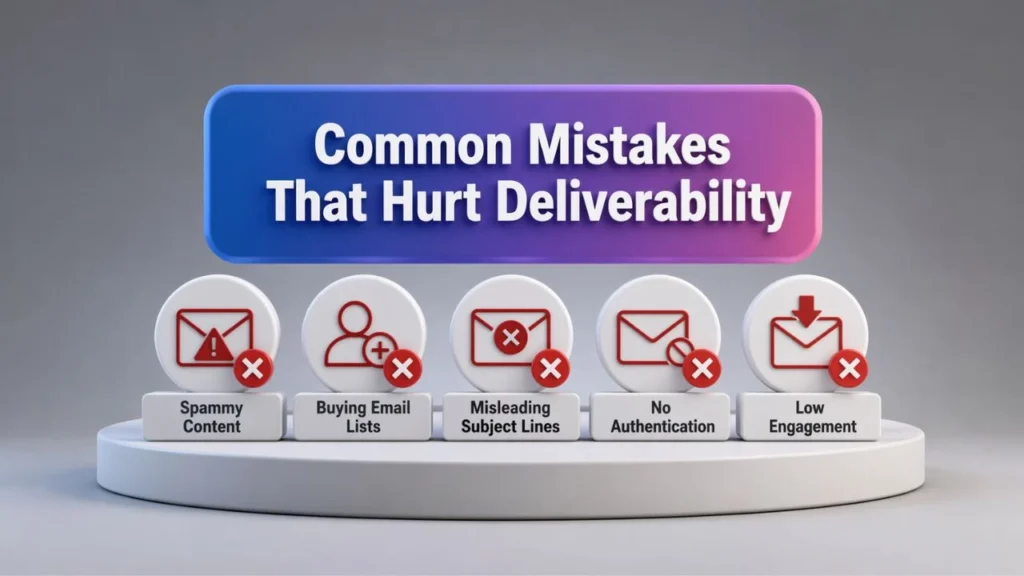
Many outreach teams think they have a solid cold email infrastructure setup when they actually have gaps that damage performance.
Here are some common mistakes:
Using the Main Domain Too Aggressively
If you send cold outreach directly from your main domain without a protective strategy, you increase the risk of harming your core brand reputation.
Publishing Weak or Incorrect Records
A missing SPF include, broken DKIM key, or incomplete DMARC policy can weaken your trust signals.
Scaling Too Fast
A technically correct cold email infrastructure setup still needs sending discipline. If you increase volume too fast, providers may flag the activity.
Ignoring Reply Management
Deliverability is not just about sending. Engagement matters too. If you ignore replies or create one sided campaigns, performance can decline over time.
Treating Cold Email as a Standalone Channel
Cold outreach performs better when it fits into an Omni-Channel Ecosystem. When your audience also sees your brand through search, content, paid media, and retargeting, your outreach feels more credible.
How Cold Email Supports a Larger Growth Strategy?
A well planned cold email infrastructure setup is not only about inbox placement. It also supports a broader customer acquisition model.
For example, cold outreach can work alongside:
- organic content that builds trust
- remarketing that increases familiarity
- landing pages that reinforce relevance
- CRM workflows that support nurture
- Performance Marketing Services that capture and convert demand
When these channels work together, your Email Marketing becomes stronger because it is supported by multiple trust signals across the buyer journey. That is the real value of an Omni-Channel Ecosystem. You are not relying on one touchpoint. You are building consistency.
When You Should Consider Email Infrastructure Services?

Some businesses can manage the basics internally. Others benefit from expert help. If you are launching multiple domains, troubleshooting spam folder issues, or scaling outreach across teams, email infrastructure services can save time and reduce costly mistakes.
You should consider email infrastructure services if:
- your campaigns keep landing in spam
- you are unsure whether SPF, DKIM, and DMARC are aligned correctly
- you are scaling outbound across multiple senders
- your main domain reputation needs protection
- you want faster diagnosis and cleaner execution
The right email infrastructure services provider can help you identify hidden issues before they affect results. That is especially valuable when outbound supports revenue goals tied to Email Marketing and Performance Marketing Services.
If you are planning to scale and want to improve inbox placement before problems grow, Get Email Deliverability Audit.
Best Practices for Long Term Success
A strong cold email infrastructure setup is not built once and forgotten. It needs attention.
Here are a few long term best practices:
- review your DNS records regularly
- keep domain usage organized
- monitor mailbox health continuously
- maintain clean sending behavior
- avoid sudden volume spikes
- align copy quality with infrastructure quality
- connect outreach with your wider Omni-Channel Ecosystem
The more disciplined your setup is, the easier it becomes to scale outreach without sacrificing trust.
Conclusion
If you want sustainable outreach performance, you need more than a good subject line and a decent list. You need a cold email infrastructure setup that mailbox providers can trust. SPF, DKIM, and DMARC are not optional technical extras. They are the foundation of modern cold outreach.
A well planned cold email infrastructure setup protects your domain, improves deliverability, and gives your campaigns room to grow. It also strengthens your broader Email Marketing strategy by making your outreach more stable, measurable, and scalable.
Whether you build it internally or use email infrastructure services, the goal is the same: create a sending environment that supports trust from day one.
If you want to find the gaps that may be limiting your inbox placement, Get Deliverability Audit.
Frequently Asked Questions
What is cold email infrastructure setup?
Cold email infrastructure setup is the technical system behind cold outreach. It includes domains, mailboxes, DNS authentication records, tracking, warm up, and monitoring processes that help emails reach inboxes more reliably.
Why are SPF, DKIM, and DMARC important?
They help receiving servers verify that your messages are legitimate. Together, they strengthen trust, reduce spoofing risk, and improve the reliability of your sending environment.
Can I send cold email without DMARC?
You can, but it is not ideal. DMARC adds reporting and policy control that help protect your domain and improve visibility into authentication issues.
Does cold email infrastructure setup improve deliverability?
Yes. A good cold email infrastructure setup improves technical trust, supports inbox placement, and reduces the risk of reputation damage. It works best when paired with good targeting, strong copy, and careful sending practices.
Should I use my main domain for cold outreach?
Many businesses prefer a secondary domain or subdomain to reduce risk to the primary brand domain. The right choice depends on your goals and risk tolerance.
Are email infrastructure services worth it?
For many businesses, yes. Email infrastructure services can help reduce setup errors, improve deliverability, and support scaling with more confidence.
How does cold email fit into an Omni-Channel Ecosystem?
Cold email works better when it supports and is supported by other channels such as organic search, paid campaigns, retargeting, and CRM follow up. That is what makes an Omni-Channel Ecosystem powerful.