
Service customers often search when they are ready to act. They may need a plumber, electrician, real estate consultant, digital marketing agency, clinic, repair expert, cleaning service, legal advisor, or other local provider. In many cases, that search happens on a phone. This is why Mobile First SEO for service business leads has become an important part of online growth.
A mobile visitor usually wants quick answers. They want to know what you offer, where you serve, whether you can solve their problem, and how they can contact you. If your website is slow, confusing, or difficult to use on a phone, visitors may leave before calling or submitting a form.
This is where mobile first SEO helps. It focuses on the mobile version of your website so users and search engines can understand your services clearly. For service based companies, this can improve rankings, local visibility, calls, enquiries, and appointment bookings.
Table of Contents
What Is Mobile First SEO?
Mobile first indexing means optimizing your website with mobile users as the main priority. It is not only about making your website fit a small screen. It is about creating a complete mobile experience where pages load fast, content is easy to read, buttons are easy to tap, and contact options are simple to use.
Search engines now look closely at the mobile version of a website. If important content is missing from mobile pages, the website may struggle to perform well. A service website should give mobile users the same useful information they would find on desktop, but in a cleaner and easier format.
For example, a service page should show the main service, location, trust points, phone number, contact form, FAQs, and clear call to action without forcing the user to scroll endlessly.
Why Mobile Search Matters for Service Businesses
Service businesses depend on user intent. A person searching for a service from a phone may be closer to taking action than someone casually browsing from a desktop. They may want to call, compare, book, ask a question, or get directions.
This makes mobile SEO for service businesses important. A strong mobile experience can help visitors move from search results to your service page and then to a call, form submission, WhatsApp message, or appointment request.
If the mobile page is hard to use, even good rankings may not create leads. A website can get traffic but still fail to convert visitors because the user journey is weak.
Common issues include:
- Slow loading pages
- Small text
- Confusing menus
- Hidden phone numbers
- Long contact forms
- Popups covering the screen
- Weak local information
- Poor service page structure
A service website should make the next step obvious. The user should not have to search for a phone number or struggle to understand whether your service is available in their area.
How Mobile Experience Affects Lead Quality
A good mobile experience does more than improve traffic. It can improve the quality of enquiries. When users can quickly understand the service, pricing direction, service area, process, and trust signals, they are more likely to contact the business with serious intent.
This is especially important for service business lead generation. The goal is not only to bring visitors to the website. The goal is to turn the right visitors into qualified leads.
A mobile page should answer these questions quickly:
- What service is being offered?
- Which location or service area is covered?
- Why should the visitor trust this business?
- How can the visitor contact the business?
- What happens after the visitor submits a form or calls?
When these answers are clear, mobile visitors feel more confident. Confidence improves conversion.
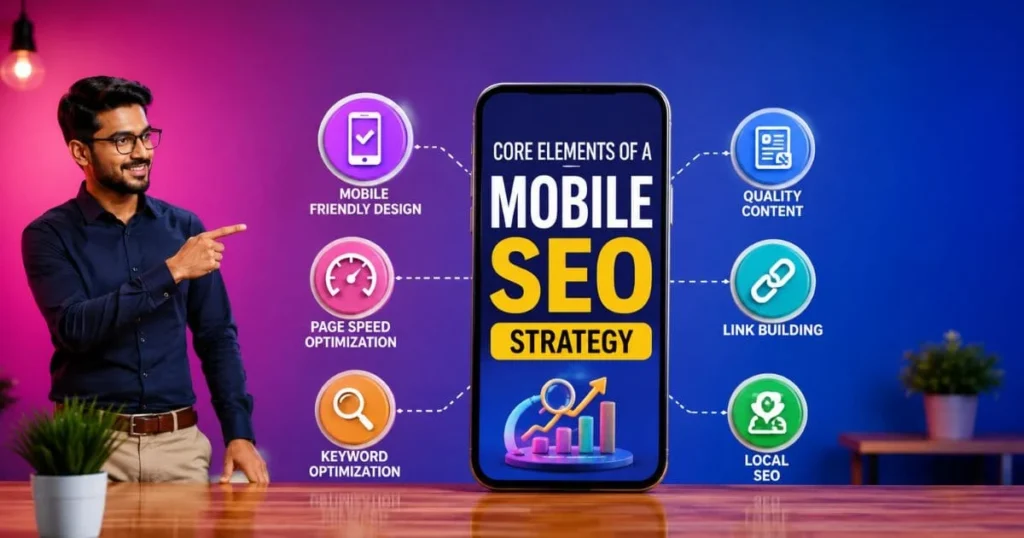
Core Elements of a Mobile SEO Strategy
A strong mobile SEO strategy for service businesses should include technical SEO, content, design, local intent, conversion planning, and a Core Web Vitals audit. These elements work together.
Fast Page Loading
Mobile visitors do not wait long. Heavy images, unused scripts, poor hosting, large sliders, and unnecessary design elements can slow down a page.
A fast page helps users stay longer and take action. Service websites should compress images, reduce heavy scripts, use clean code, and test important pages regularly.
Clear Above the Fold Content
The first screen on mobile matters a lot. It should clearly show the service, location, trust point, and action button. A visitor should immediately know whether they are in the right place.
A weak first screen can increase exits. A strong first screen can increase calls and enquiries.
Easy Navigation
Mobile menus should be simple. Users should be able to find services, locations, contact details, reviews, and FAQs without confusion.
Service pages should be easy to reach from the homepage, blog posts, and related pages.
Click to Call Option
Many mobile users prefer calling instead of filling out a form. A tap friendly phone button can improve direct enquiries.
The call button should be visible, easy to tap, and placed where users naturally look for it.
Short Contact Forms
Long forms reduce conversions. A mobile form should ask only for essential details such as name, phone number, service required, and message.
Extra fields can be collected later during follow up.
Mobile SEO Elements and Their Impact on Leads
| Mobile SEO Element | Why It Matters | Lead Generation Benefit |
|---|---|---|
| Fast loading page | Users stay longer when pages open quickly | More calls and form submissions |
| Clear headline | Visitors understand the service instantly | Better enquiry quality |
| Click to call button | Mobile users can contact the business quickly | More direct phone leads |
| Short form | Reduces effort for users | More completed enquiries |
| Local content | Helps users confirm service availability | Better local leads |
| Trust signals | Builds confidence before contact | Higher conversion rate |
| FAQs | Answers common doubts | Fewer drop offs |
| Simple navigation | Helps users find the right page | Better page engagement |
Mobile Friendly SEO for Service Pages
Mobile friendly SEO means making every service page easy to access, read, and use on a phone. A service page should not feel like a compressed desktop page. It should be planned for mobile behaviour, and a website audit checklist can help identify layout, speed, and usability issues before optimization.
A strong mobile service page should include:
- Clear H1 heading
- Short service introduction
- Location or service area mention
- Main benefits
- Process explanation
- Customer trust points
- FAQs
- Contact form
- Click to call button
- Related internal links
What Should Appear First on a Mobile Service Page?
The first screen should include the service name, location, short value statement, and contact option. This helps users decide quickly and reduces confusion.
For example, a local service provider can show the main service, the city served, a short trust message, and a call button in the first view.
Mobile First Website Optimization for Local Visibility
Mobile first website optimization is closely connected to local SEO and service area SEO. Many service searches include local intent, even when users do not type a city name. Search engines often understand that the user wants a nearby provider.
To improve local visibility, service businesses should include:
- Service area details
- Location based FAQs
- Clear address or coverage area
- Google Business Profile connection
- Local reviews where valid
- Internal links to location pages
- Consistent business details
- Service specific landing pages
A mobile visitor who arrives from Google Maps or a local search result should find relevant information quickly. If they land on a slow or unclear page, the business may lose a ready to convert lead.

How to Generate Leads From Mobile Traffic
To generate leads from mobile traffic, the website should remove every unnecessary step between the visitor and the action. The page should not only inform. It should guide the user toward a call, enquiry, quote request, or booking.
Here are practical ways to improve results:
Use Clear Calls to Action
A mobile page should use action focused buttons such as:
- Call now
- Request a quote
- Book a consultation
- Send enquiry
- Check availability
The CTA should match the user intent. Emergency services may need a call button. Professional services may need a consultation form. Appointment based services may need a booking option.
Place Contact Options Throughout the Page
Do not place contact details only at the bottom. Add contact options near important sections such as after the introduction, after benefits, after process, and before FAQs.
Add Trust Before the CTA
Users often hesitate before contacting a business. Add trust signals near CTAs, such as reviews, years of experience, service coverage, certifications, or simple process details.
Make Forms Easy to Complete
Use large fields, clear labels, and minimum required information. Avoid complicated dropdowns when a simple text field works better.
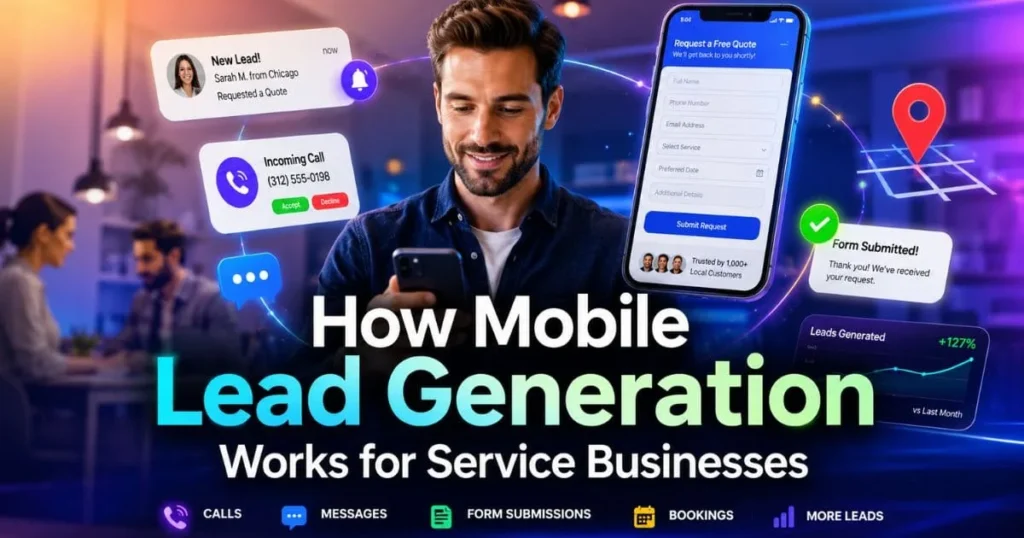
How Mobile Lead Generation Works for Service Businesses
Mobile lead generation works best when search intent and page design match. A user searching from a phone may be comparing options quickly. The website should provide enough information to help them choose without making the page too heavy.
Important mobile lead elements include:
- Fast loading
- Clear service message
- Local relevance
- Easy contact
- Short forms
- Trust proof
- Useful FAQs
- Smooth navigation
When these points work together, mobile website leads become easier to capture.
Common Mobile Problems and Better Fixes
| Problem | How It Hurts Leads | Better Fix |
|---|---|---|
| Page loads slowly | Visitors leave early | Compress images and reduce scripts |
| Phone number is hidden | Users cannot call quickly | Add a visible tap to call button |
| Form is too long | Users abandon the form | Ask only for essential details |
| Content is hard to read | Users do not understand the offer | Use short paragraphs and clear headings |
| No location details | Users doubt service availability | Add service area information |
| Weak CTA | Users do not know the next step | Use clear action buttons |
| Too many popups | Mobile screen feels blocked | Keep popups minimal |
| Missing FAQs | Users leave with doubts | Add short question based answers |
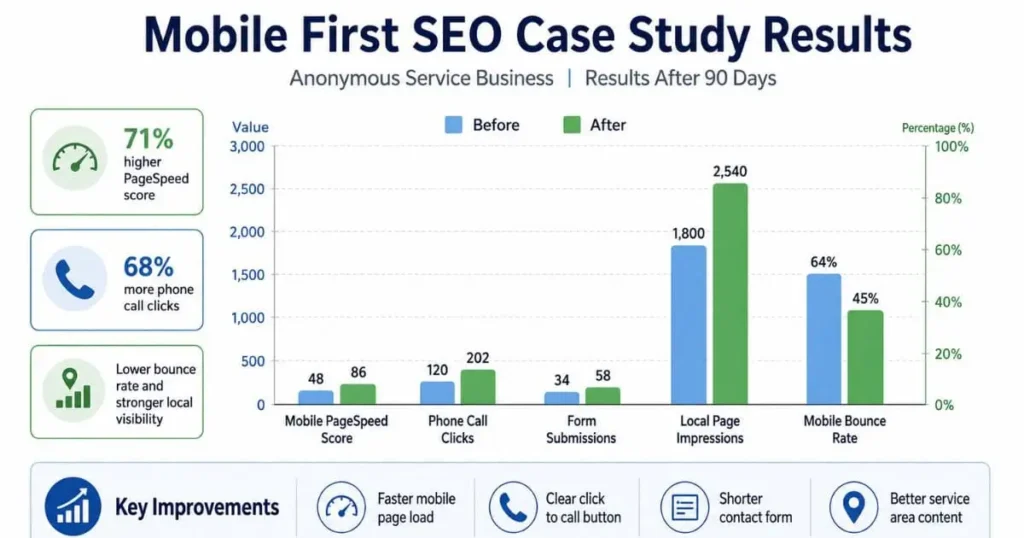
Case Study: How a Service Business Improved Mobile Leads
A local service provider was receiving website traffic but very few enquiries. Analytics showed that most visitors were using mobile devices. The problem was not only rankings. The mobile experience was weak.
Problems Found
The page was slow, the phone number was difficult to find, and the contact form had too many fields. The main service message was also below the first screen, so users had to scroll before understanding the offer. Location details were unclear, and the FAQ section was missing.
Changes Made
The business improved image size, removed unnecessary scripts, added a clear service headline, placed a click to call button near the top, reduced form fields, added local service details, and included FAQs. Internal links were also added from blog posts to main service pages.
Results After 90 Days
The website saw better mobile engagement, more phone clicks, more form submissions, and stronger performance from local search pages. The biggest improvement came from making the mobile journey simple and action focused.
Key Learning
A service website can attract traffic but still lose leads if the mobile experience is weak. Better structure, faster pages, and easier contact options can improve results without changing the whole website.
Content Tips for Better Mobile Rankings
Good content still matters on mobile. The difference is that mobile content should be easier to scan.
Use short paragraphs, useful headings, bullets, direct answers, and question based sections. Avoid long blocks of text that make the page look heavy on a small screen.
A service page should explain:
- What the service includes
- Who needs the service
- Which area is served
- What problems it solves
- How the process works
- Why the business is trustworthy
- How to contact the business
This format helps both users and search engines understand the page.
Voice Search and Mobile Service Queries
Many mobile searches are conversational. People may ask voice assistants questions such as how to find a nearby service provider, book a local service, or rank google maps in Kolkata for better local visibility.
- Who offers this service near me?
- How can I book this service?
- What is the best way to contact a local provider?
- Which service provider is open now?
- How much does this service cost?
To support voice search, service businesses should add natural questions and direct answers. FAQs are useful because they match how people speak.
For example, instead of only using short keywords, write helpful answers around full questions. This can support voice search, AI search visibility, and featured answer style results.

AEO and GEO Tips for Better AI Search Visibility
Search is changing. People now use AI tools, answer engines, and generative search results to compare services. Service businesses should make content easy for these systems to understand.
Use clear definitions, structured headings, FAQs, service details, location information, schema markup, and AEO content briefs to guide search engines and AI systems with direct, useful answers. Add direct answer sections that explain the main point in simple language.
For better answer engine optimization, include:
- Short definitions
- Question based headings
- Clear service explanations
- Step based answers
- Local context
- Trust signals
- FAQ schema where suitable
For generative engine optimization, include entity rich content. Mention relevant concepts such as Google Business Profile, local SEO, Core Web Vitals, service pages, structured data, reviews, and appointment booking.
How to Measure Mobile SEO Results
Service businesses should not judge performance only by traffic. The real goal is enquiries and qualified leads.
Track these metrics:
- Mobile organic traffic
- Mobile impressions
- Mobile click through rate
- Phone call clicks
- Form submissions
- Appointment bookings
- Google Business Profile website clicks
- Local keyword rankings
- Mobile bounce rate
- Core Web Vitals performance
These metrics show whether the website is attracting users and converting them into leads.
Common Mistakes to Avoid
Service businesses often make small mobile mistakes that reduce conversions.
Ignoring the First Screen
If the first screen does not show the service clearly, users may leave.
Using Heavy Images
Large images can slow down the page and hurt user experience.
Making Forms Too Complicated
Mobile users do not want to fill long forms. Keep forms simple.
Hiding Important Content
Do not remove important service details from the mobile version.
Forgetting Local Intent
Local users want to know whether the service is available in their area. Add location clarity.
Weak Internal Linking
Blog posts should link to relevant service pages so users can move from reading to taking action.
How to Build SEO Leads for Service Businesses
SEO leads for service businesses come from a mix of visibility and conversion. Ranking is only the first step. The page must also build trust, make contact easy, and use SEO competitor gap analysis to find missed ranking and lead opportunities.
A useful process includes:
- Find mobile search intent
- Build clear service pages
- Improve mobile speed
- Add local content
- Add direct CTAs
- Use short forms
- Add FAQs
- Add schema markup
- Improve internal links
- Track calls and enquiries
This process helps turn search visibility into real business enquiries.
FAQ
Q: What is mobile first SEO?
Ans: It is the process of optimizing a website so the mobile version works well for users and search engines. It focuses on speed, structure, content, usability, and mobile conversion.
Q: Why is mobile optimization important for service businesses?
Ans: Many service customers search from phones when they are ready to call, book, compare, or request a quote. A weak mobile page can reduce leads even if rankings are good.
Q: How can a service business improve mobile enquiries?
Ans: A service business can improve enquiries by using fast pages, clear headings, click to call buttons, short forms, local content, trust signals, and helpful FAQs.
Q: What should a mobile service page include?
Ans: A mobile service page should include service details, location relevance, benefits, process, reviews or trust points, FAQs, a short form, and an easy phone call option.
Q: Does page speed affect mobile leads?
Ans: Yes. Slow pages can make users leave before they read the content or contact the business. Faster pages usually create a better user experience.
Q: How does local SEO connect with mobile search?
Ans: Mobile users often search for nearby services. Local SEO helps search engines understand where the business serves and which users are most relevant.
Q: Are FAQs useful for mobile SEO?
Ans: Yes. FAQs answer common user questions in a simple format. They also support voice search, answer engines, and better user understanding.
Q: How many fields should a mobile contact form have?
Ans: A mobile form should ask only for essential details. Name, phone number, service need, and message are usually enough for the first step.
Conclusion
Service businesses need more than a website that looks good on desktop. They need a mobile experience that loads fast, explains services clearly, builds trust, and makes contact simple.
Mobile users often arrive with strong intent. They may be ready to call, book, or request a quote. If your website helps them act without friction, search traffic can become real enquiries.
A practical mobile approach includes fast pages, clear service content, local relevance, easy navigation, click to call buttons, short forms, FAQs, and strong internal linking. When these elements work together, mobile search can support steady lead growth for service based businesses.